
S-RM has identified threat actors leveraging the Mimecast Portal to retain persistent access to victim’s emails and conduct invoice fraud. This advisory explains the threat we’ve identified, how to identify and investigate a Mimecast compromise, and the required containment and prevention measures to defend against this threat.
Background: BECs and the Mimecast Portal
Business email compromises (BECs) continue to be a pervasive threat and the FBI estimates that since 2013 over USD 50 billion has been lost due to this type of attack. Threat actors in a BEC typically aim to either:
- Breach more mailboxes via a phishing campaign launched from the compromised mailbox.
- Conduct invoice fraud via identifying email correspondence in a compromised mailbox that discusses a payment or the intention to make a payment (such as the purchase of a property). In 2025, over 25% of BECs that S-RM responded resulted in successful payment diversion with the highest more than USD 4.5 million.
Mimecast is a cloud-based email security platform that protects organisations from email-based threats such as, phishing, spoofing, and emails that contain malicious software. The software also has the functionality to archive emails, advanced searches across historical and live email data, and send emails directly from the Mimecast portal using the email address of the mailbox that Mimecast is deployed to.
The threat
Threat actors have developed two advanced BEC techniques that exploit the integrated authentication between Microsoft 365 (M365) and Mimecast. By obtaining a single set of employee credentials through phishing, including the multi-factor authentication (MFA) token, attackers can effortlessly access Mimecast's Personal Portal. This access allows them to either send deceptive emails without detection (see 'first attack variant' below) or gather business intelligence for external fraud schemes (see ‘second attack variant’ below). Both attacks depend on the common configurations of Microsoft Directory Synchronisation with Mimecast and web portal access for users.
First attack variant: M365 compromise + Mimecast persistence
Phase 1: Credential theft and initial access
Threat actors steal employee M365 credentials through phishing. They log into Outlook or the web app to send fraudulent invoices, then use the same credentials to access the victim's Mimecast Personal Portal.
Phase 2: Mimecast persistence establishment
Inside Mimecast’s personal portal, attackers secure long-term access by resetting passwords or updating recovery contacts, and adding their own devices. This backdoor remains active even after M365 accounts are locked or passwords changed.
Phase 3: Post-containment execution
When IT teams contain the M365 compromise, attackers seamlessly switch to Mimecast's personal portal and continue sending emails as the victim. They continue sending fake invoices directly from Mimecast's infrastructure - emails appear fully legitimate to recipients (and pass common email security measures) but leave no trace in M365 Sent Items.
| Activity | What makes it invisible |
| Sent emails | Missing from victim's Outlook Sent folder |
| Mail logs | Bypasses M365 Message Trace entirely |
| Recipient experience | Looks like authentic mail from victim's address |
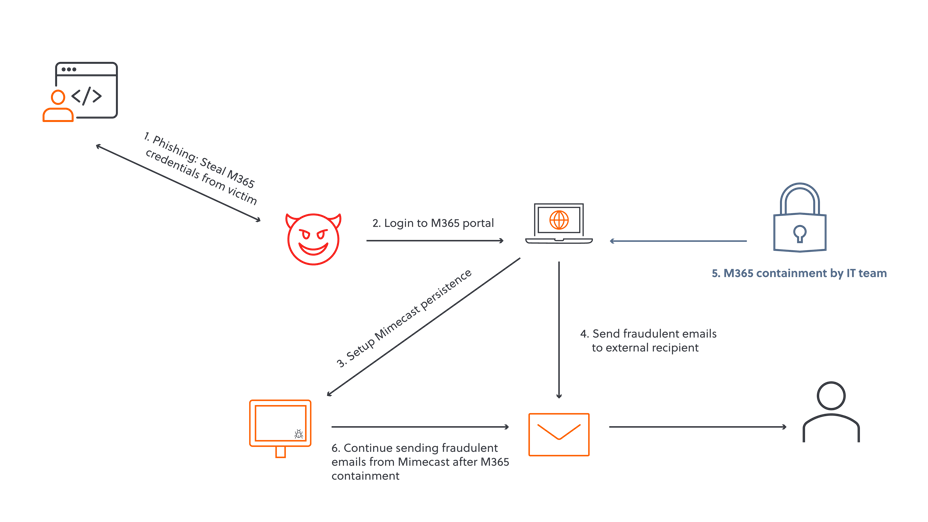
Figure 1 Attack chain of variant one
Second attack variant: Mimecast reconnaissance + typosquatted domain execution
Phase 1: Credential Theft → Mimecast-only access
Threat actors phish M365 credentials but skip M365 login entirely, using shared credentials to access the victim's Mimecast Personal Portal directly.
Phase 2: Intelligence gathering
Attackers silently harvest business context from Online Inbox/Archive (vendor relationships, invoice patterns), Message Tracking (communication timing), and email signatures/templates.
Key Advantage: Since there are no M365 interactive logins, the threat actor remains invisible to M365 Sign-in logs, Risky Sign-ins, and Defender alerts.
Phase 3: Typosquatted email execution
Armed with real details, attackers send fraudulent emails from a typosquatted domain (e.g. micr0soft.com vs microsoft.com), mimicking legitimate invoices with stolen pricing/POs/signatures—entirely external, bypassing all Mimecast/M365 filtering.
| Activity | What makes it invisible |
| M365 Logins | Zero interactive sign-ins flagged |
| Sent emails | External domain, no mailbox activity |
| Victim awareness | No outbound mail from their account |
| Context fit | Uses real business intelligence gathered from Mimecast to fool the external recipient |
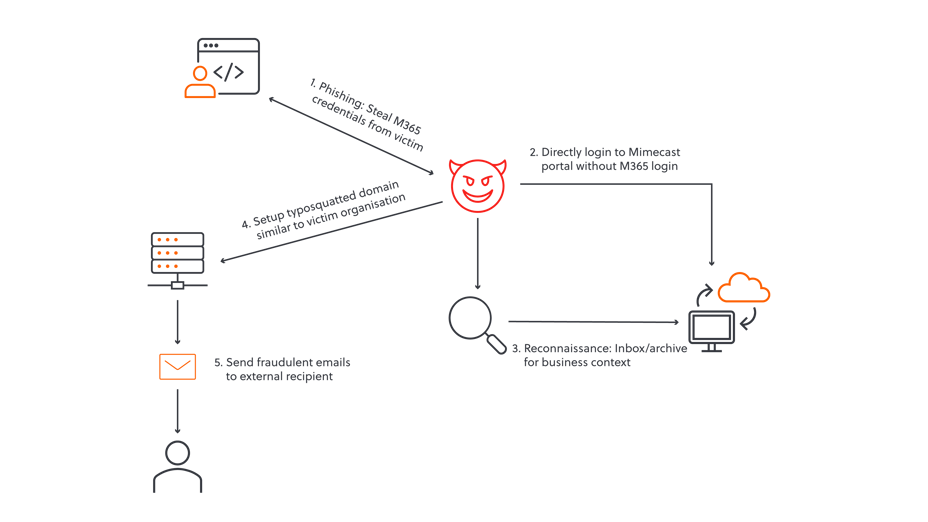
Figure 2 Attack chain of variant 2
What makes both type of attacks possible?
Both attack variants exploit shared authentication between M365 and Mimecast. Most tenants use Directory Synchronization + SSO (Domain SSO/SAML), allowing M365 credentials to authenticate directly to the Mimecast Personal Portal.
Even in native Mimecast setups (separate credentials), attackers succeed because:
- Users commonly reuse M365 passwords across services.
- Mimecast often lacks MFA enforcement, making guessed/reused credentials viable.
Root cause: Single phished credential provides dual-platform access, either via legitimate sync or poor password hygiene.
How to investigate Mimecast compromise through the administration console
- Audit suspicious logins: Check for User Logged-on events alongside M365 sign-ins.
- Review detections: Navigate to the Analysis and Response dashboard for Mimecast-flagged threats.
- Trace emails sent by compromised account: Search for emails sent by the compromised account.
- Check delegate access: Check if the compromised account has access to other mailboxes and assess scope of compromise.
- Review App sessions. Review and terminate persistent application sessions.
- Audit MFA persistence. Check for any threat actor added authentication methods.
Containment and prevention
Organisations that identify that their Mimecast has been breached should:
- Password and session token: The compromised user’s Mimecast credentials and session token must be reset to invalidate the credentials and Mimecast session.
- MFA methods: Threat actor’s often add their own MFA method to retain persistent access. The compromised user’s MFA devices must be reviewed and deleted if not recognised.
- Secure other systems: People frequently re-use passwords and organisations should review other cloud platforms for unauthorised access.
The following preventative measures should be put in place:
- Enforce MFA: Enforce MFA on Mimecast in native setups to reduce the likelihood of a breach. Multifactor authentication is an additional means to verify a user’s identity, such as an authenticator application notification or text message.
- Review use: Organisations should audit who requires Mimecast mail archiving and remove those who do not use the service but have an account. The audit logs should also be regularly reviewed for unauthorised access.
- Training: Train individuals to identify a phishing email and the appropriate measures to take if unauthorised access is identified.
Please contact S-RM if you are concerned about your organisation’s exposure.

.jpg?width=121&height=121&name=S-RM_Headshots_SESSION-2_LOW-RES_280323-1-95_websize%20(1).jpg)